AI Layer vs Contact Centre Replacement: How to Add AI Without Rip-and-Replace
August 27, 2026
Time:
6
mins

.webp)
Most contact centre leaders now agree that AI needs to be part of their customer service strategy.
The harder question is how to get there without disrupting the platform, the team, and the customer experience you already have.
According to Deloitte's 2026 global contact centre report, less mature organisations point to technology integration (72%) and legacy systems (58%) as their biggest barriers to AI adoption.
Those figures aren't reasons to wait. They're reasons to choose the right adoption path.
There isn't one route to AI in customer service. There are multiple, and they carry very different levels of disruption, cost, and risk.
In this article, we'll cover:
Most organisations don't need to replace their contact centre platform to add AI. The right approach depends on how much disruption, integration work, and governance oversight you're prepared to take on.
Contact centres are under real pressure to add AI, and just as much pressure not to break what already works.
That tension is exactly what Deloitte's data reflects. The organisations struggling most with AI adoption aren't struggling with the AI itself; they're struggling with integration and legacy technology.
Voice AI, in particular, is reshaping how contact centres handle phone support, putting pressure on IT and CX leaders to decide how it fits alongside everything already running in the background.
For a Head of Contact Centre or Customer Service Manager, the stakes are personal as well as operational.
A messy migration reflects on the person who championed it, not just the vendor who sold it.
That's why the adoption route matters as much as the AI itself.
The real decision isn’t whether to adopt AI customer service, but how to adopt it.
There are four main routes to adding AI to a contact centre, each with different implications for cost, disruption, speed, and flexibility.
An AI layer integrates directly with the telephony and CRM systems you already run, adding voice and chat AI without touching the underlying infrastructure.
In practice, that means importing your existing knowledge base, defining how the AI should behave with prompts, and letting it work across voice and digital channels from day one.
This is typically the lowest-disruption option, because your existing routing, agent workflows, and reporting stay in place.
It's also usually the fastest to deploy, since you don't need to migrate historical data, retrain agents on a new platform, or renegotiate telephony contracts.
The trade-off is that you're dependent on how well the AI layer integrates with your specific platform, so choosing the right AI provider matters more here than almost anywhere else.

If your CCaaS or UCaaS provider has built-in AI, it can feel like the path of least resistance.
There's no new vendor to onboard and no separate integration to manage, since the AI lives inside the platform you're already paying for.
The catch is that native AI is usually built for that platform's ecosystem, not for the specific channels or workflows your contact centre runs.
Coverage can be uneven too. Voice AI may be mature while chat and messaging lag behind, or vice versa, and the pace of new features depends entirely on your platform vendor's own roadmap.
For contact centres that only need one AI-powered channel and are happy to wait for the vendor's release schedule, this can be a reasonable starting point.
A full platform migration replaces your telephony, routing, and AI capability all at once, on a new vendor's roadmap.
This is the highest-disruption option by a wide margin.
It typically means months of implementation, data migration, agent retraining, and parallel running before you can switch off the old system.
It can be the right call when your current platform is genuinely reaching end of life, when you need capabilities your existing infrastructure simply can't support, or when consolidating onto a single vendor's ecosystem is a strategic priority.
For contact centres where the platform still does the job, though, a full migration solves a problem you don't have just to add an AI capability on top.

A phased hybrid approach rolls AI out gradually, often starting with an AI layer on a single channel before expanding.
This is less an alternative to the first three options and more a way of sequencing them, so a business case for AI can be built on real results before further investment is approved.
Talkative customer Healthspan, a leading supplement supplier and wellness brand in the UK, is a strong example of this approach in practice.
Rather than trying to transform everything at once, Healthspan started with live chat and messaging, then introduced AI across chat and email before expanding into voice.
This staged rollout helped Healthspan prove value, build internal confidence, and establish the processes and knowledge foundations needed to expand further.
The results also gave the business a clear case for continued investment: Healthspan’s digital AI Agent has achieved a 90% resolution rate, while its Voice AI contains 50% of customer calls.
For an Operational Buyer building a case for AI, a phased approach also lowers the risk of asking for a large budget upfront. Each stage can prove its own return before funding the next.
It allows you to start small with one channel or use case, prove value, and then expand from there.
The label "AI-powered" tells you almost nothing about disruption, cost, or risk, so it's worth judging each option against the same criteria.
Governance and implementation ownership are the two criteria that get the least attention and cause the most regret.
An AI layer or native AI option should still be able to answer questions about AI guardrails, data handling, and escalation rules, in the same way a full migration would.
For voice specifically, that includes voice AI compliance around consent, recording, and data protection, regardless of which of the four routes you take.
Implementation ownership matters just as much. Ask who is accountable in week one if something goes wrong: your team, the AI vendor, or the platform vendor.
The answer should be clear before you sign anything, not worked out after go-live.
Here’s how the four approaches compare across the criteria that matter most:
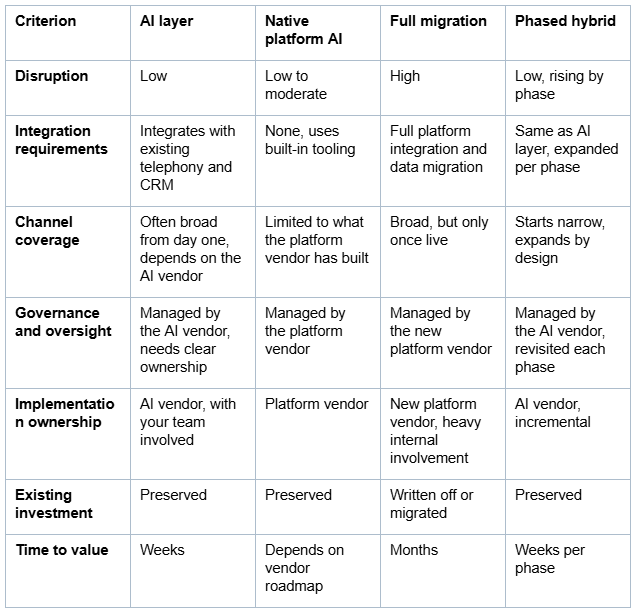
If your current platform still meets your needs and the gap is specifically AI capability, an AI layer is usually the fastest, lowest-risk route.
If you only need one AI-powered channel and can work within your existing vendor's release schedule, native platform AI may be enough.
If your platform itself is failing you, independent of AI, a full migration may be the right call, and AI becomes one benefit among several rather than the main driver.
If you need to build internal confidence and budget before committing further, a phased hybrid rollout lets you prove value channel by channel.
The question worth asking isn't "which AI is best," it's "which route gets me the AI capability I need with the least disruption to what already works."

Talkative is built specifically as an AI layer, adding voice and digital AI to the contact centre technology you already use without requiring a platform change.
We can work alongside a wide range of existing contact centre, telephony, CRM, and communications systems, with integrations including:
These are just some examples; our AI layer is designed to fit around the technology already in place, rather than forcing businesses into a prescribed platform stack.
This allows businesses to add AI while keeping their existing platforms, routing, and agent workflows in place.
It also means you can introduce new AI capabilities without the cost and disruption of replacing infrastructure that is already working for you.
Standard Voice AI implementation runs to a six-week timeline, which is markedly faster than a full platform migration.
For contact centres weighing up AI ROI against the cost and disruption of a full migration, that combination of speed, flexibility, and preserved investment can be the deciding factor.

Adding AI to a contact centre doesn't have to mean replacing your existing systems.
The four routes covered here (AI layer, native platform AI, full migration, and phased hybrid) all get you to AI customer service, but they arrive there at very different costs, timelines, and risk levels.
For most mid-market contact centres, the fastest and lowest-risk path is to add AI on top of what's already working, rather than replacing it to get there.
If you want to talk through what that could look like for your specific setup, get in touch with the Talkative team today.
Get an evidence-based review of legacy voice self-service and what’s changing in phone support - with practical next steps for CX and contact centre leaders.


